
WBiPro Interactive Smart Projector
How to Turn Any Wall into a 100-Inch Interactive Smartboard
A quiet revolution in classroom technology for school leaders who want active learning, zero lesson disruptions, and digital transformation that fits their actual budget.
What is the WBiPro Interactive Smart Projector?
The WBiPro is a plug-and-play classroom system that turns any standard wall into a massive 100-inch interactive digital teaching board—giving schools a complete smart classroom without the high cost or fragile glass of traditional touchscreens.
Saves Classroom Budget
Zero Setup Stress
Built for Student Safety
Instant Classroom Control
Why Schools Switch
problems WBiPro solves for your teachers & school
Front-row privilege vs. equal access
A 65-inch or 75-inch flat panel looks impressive in a small room. But in a standard classroom with 40 or 50 students, children sitting in the back three rows struggle to read small text and detailed STEM diagrams.
WBiPro FIX: Scales instantly from 80 inches to 100 inches on any flat wall. Every student gets an equal, front-row visual experience — fostering true inclusive learning across the entire room.
Steep price tags vs. sustainable schoolwide budgets
Interactive flat panels and high-end smart TVs carry steep initial price tags, expensive maintenance that quickly drain school operating budgets. When a massive LED screen cracks or suffers backlight failure, the replacement cost often equals buying a whole new unit — rendering long-term schoolwide adoption financially unsustainable.
WBiPro FIX: Exceptional cost efficiency across the entire product lifecycle. WBiPro delivers a massive, immersive interactive display at a fraction of the capital expenditure of a large smart TV. Long-lasting projection components, and durable ePen technology dramatically lower total cost of ownership — letting schools, districts, and Ministries equip multiple classrooms for the cost of a single traditional flat panel.
Passive Listening vs. Active Participation
Real learning doesn’t happen when students sit passively staring at slides. It happens when teachers can effortlessly write, annotate over digital content, and invite students up to the board to solve problems, draw diagrams, and manipulate lessons in real time.
WBiPro FIX: Equipped with a stylus ePen, WBiPro delivers lightning-fast, zero-lag pen accuracy on any projected wall surface. Teachers can tap, write, drag 2D science simulations, and annotate over PDFs or live websites as naturally as using a dry-erase marker—transforming passive lectures into an active, interactive learning station.
Heavy smart TVs vs. portable, lightweight projection
Traditional 75-inch or 86-inch interactive smart TVs weigh 50 to 80 kilograms. Once mounted, they’re locked to a single room — or bolted onto a bulky, tipping-hazard floor cart that eats up classroom floor space and can’t cross door sills or stairs.
WBiPro FIX: Weighs a fraction of a traditional display. One teacher or administrator can carry it between classrooms, science labs, or multi-purpose halls, turning any flat white wall or whiteboard into an interactive learning station — with no floor space lost to a cart.
Reclaiming instructional time
When a teacher spends ten minutes scrambling for dongles, adjusting laptop display settings, or waiting for a system to boot, classroom management deteriorates and precious instructional time is lost.
WBiPro FIX: Streamlined dual-cable connectivity (HDMI + USB-C) directly links the teacher’s laptop to the projector and optical sensor camera. Mount once, calibrate the ePen in under a minute, and enjoy a reliable, 5-minute initial setup for any classroom.
Front-row privilege vs. equal access
A 65-inch or 75-inch flat panel looks impressive in a small room. But in a standard classroom with 40 or 50 students, children sitting in the back three rows struggle to read small text and detailed STEM diagrams.
WBiPro FIX: Scales instantly from 80 inches to 100 inches on any flat wall. Every student gets an equal, front-row visual experience — fostering true inclusive learning across the entire room.
Steep price tags vs. sustainable schoolwide budgets
Interactive flat panels and high-end smart TVs carry steep initial price tags, expensive maintenance that quickly drain school operating budgets. When a massive LED screen cracks or suffers backlight failure, the replacement cost often equals buying a whole new unit — rendering long-term schoolwide adoption financially unsustainable.
WBiPro FIX: Exceptional cost efficiency across the entire product lifecycle. WBiPro delivers a massive, immersive interactive display at a fraction of the capital expenditure of a large smart TV. Long-lasting projection components, and durable ePen technology dramatically lower total cost of ownership — letting schools, districts, and Ministries equip multiple classrooms for the cost of a single traditional flat panel.
Passive Listening vs. Active Participation
Real learning doesn’t happen when students sit passively staring at slides. It happens when teachers can effortlessly write, annotate over digital content, and invite students up to the board to solve problems, draw diagrams, and manipulate lessons in real time.
WBiPro FIX: Equipped with a stylus ePen, WBiPro delivers lightning-fast, zero-lag pen accuracy on any projected wall surface. Teachers can tap, write, drag 2D science simulations, and annotate over PDFs or live websites as naturally as using a dry-erase marker—transforming passive lectures into an active, interactive learning station.
Heavy smart TVs vs. portable, lightweight projection
Traditional 75-inch or 86-inch interactive smart TVs weigh 50 to 80 kilograms. Once mounted, they’re locked to a single room — or bolted onto a bulky, tipping-hazard floor cart that eats up classroom floor space and can’t cross door sills or stairs.
WBiPro FIX: Weighs a fraction of a traditional display. One teacher or administrator can carry it between classrooms, science labs, or multi-purpose halls, turning any flat white wall or whiteboard into an interactive learning station — with no floor space lost to a cart.
Reclaiming instructional time
When a teacher spends ten minutes scrambling for dongles, adjusting laptop display settings, or waiting for a system to boot, classroom management deteriorates and precious instructional time is lost.
WBiPro FIX: Streamlined dual-cable connectivity (HDMI + USB-C) directly links the teacher’s laptop to the projector and optical sensor camera. Mount once, calibrate the ePen in under a minute, and enjoy a reliable, 5-minute initial setup for any classroom.
Why Choose WBiPro
What you're signing up for when you choose WBiPro
Up and Running in <5 Minutes
Every WBiPro system includes automated calibration. Teachers don’t need an IT technician in the room to keep the board aligned.
Built for Daily Classroom Wear & Tear
Fully certified under international CE, FCC, RoHS, and ISO9001 standards, meeting all public-sector procurement and safety requirements.
Local Warranty, Spare Parts & Teacher Training
Managed regionally whilst providing localised technical support, spare parts availability, and in-person or virtual teacher training workshops.
Dual-engine software power
Native Standalone Whiteboard
Zero PC required. Turn on & teach in seconds.
For quick lessons, spontaneous discussions, or classrooms without dedicated laptops.
The WBiPro’s onboard Android system runs a native, ultra-responsive whiteboard directly on the hardware. No external computer, no boot-up delays, and zero cable clutter.
- Natural ePen writing & drawing
- Instant precision eraser
- Smart non-marking pointer mode

Whiteboard Functions
Versatile Writing & Editing: Write, sketch, and erase with ease using multiple colored pens, adjustable stroke thicknesses, and a precise eraser tool.
Smart Pointer Mode: Guide focus across the board using a non-marking pointer without cluttering the screen.
Shapes & Geometry: Quickly draw straight lines, arrows, and precise boxes or circles (available in both outline and filled formats).
File Management: Save your workspace sessions and instantly open previous files to keep lessons organized and continuous.
Sports Field Templates: Instantly load tactical layouts for basketball, badminton, rugby, American football, soccer and volleyball to map out strategies with precision.
Ruled Templates: The WBiPro digital whiteboard’s built-in graph, manuscript, rice grid, and ruled templates enhance lesson clarity by providing structural guidelines for precise mathematical plotting, consistent handwriting, and organized character layout. These versatile backgrounds integrate directly into the digital workspace to help educators instantly adapt their board layout for any subject.
The complete interactive toolkit for your laptop.
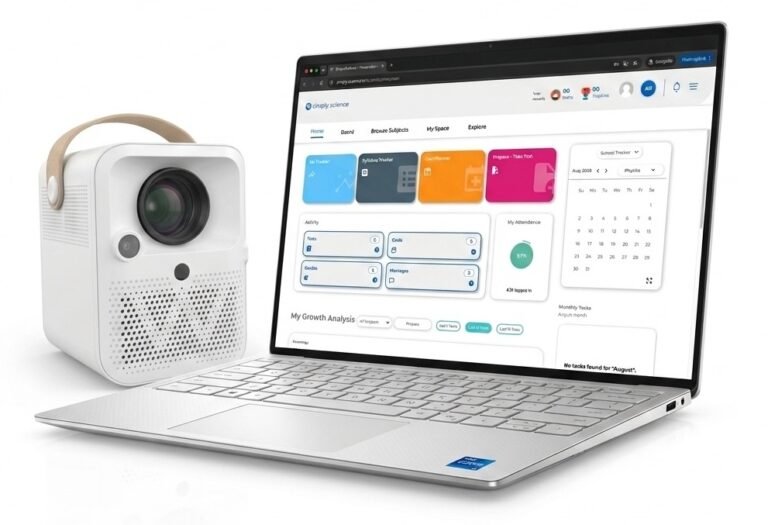
When connected to a Windows laptop via the 1-cable setup (HDMI + USB-C), you unlock MultiBoard — an enterprise-grade teaching suite that transforms standard desktop applications into an interactive classroom experience.
- Smart non-destructive document annotation & layering
Teach from existing textbooks and past exam papers without ruining your PDF or PowerPoint master files.
- Re-editable vector annotations — MultiBoard saves your handwritten notes, solutions, and diagrams as a separate, editable layer over the PDF — never flattening or destroying the original document.
- Pick up where you left off — save an annotated PDF during Period 1, re-open it in Period 2, and selectively edit or erase previous notes with the ePen while keeping the underlying textbook 100% pristine.
- Infinite reusability — clear all annotations with a single tap to present the original document a fresh, clean worksheet for the next class or academic year.
- Pre-integrated interactive classroom micro-apps
- Magnifier tool — instantly zoom in on detailed map coordinates, science diagrams, or fine print so students in the back row never miss a detail.
- Integrated timer & stopwatch — keep group activities, practical experiments, and timed quizzes strictly on schedule directly on the main display.
- Embedded web & media player — pull up online references via the integrated browser or drop local video files onto the board without leaving your active lesson canvas.
Built-in geometry & measurement suite
- Interactive compass — anchor a center point and draw perfect, scalable circles of any radius with the ePen.
- Digital protractor — measure and demonstrate angle relationships directly on projected shapes.
- Adjustable triangle & ruler — draw precise straight lines, parallel angles, and geometric proofs effortlessly.
Why procurement teams & school directors love this setup
- Zero teacher frictionTech-averse educators can stick to the simple 1-touch Native Whiteboard, while advanced STEM teachers leverage the full Windows MultiBoard suite.
- 100% offline capabilityTeachers don't need active internet connections or cloud-sync logins to access their whiteboard or geometry tools.
- Zero software licensing feesBoth the Native Whiteboard and MultiBoard Windows Suite are included out-of-the-box with no recurring software subscriptions.
Ready To teach from day 1
What's in the box & hardware specs
Everything you need to start teaching on day one
Unpack, plug in, and transform any wall into a 100-inch interactive display in under 5 minutes. No hidden accessory purchases required.
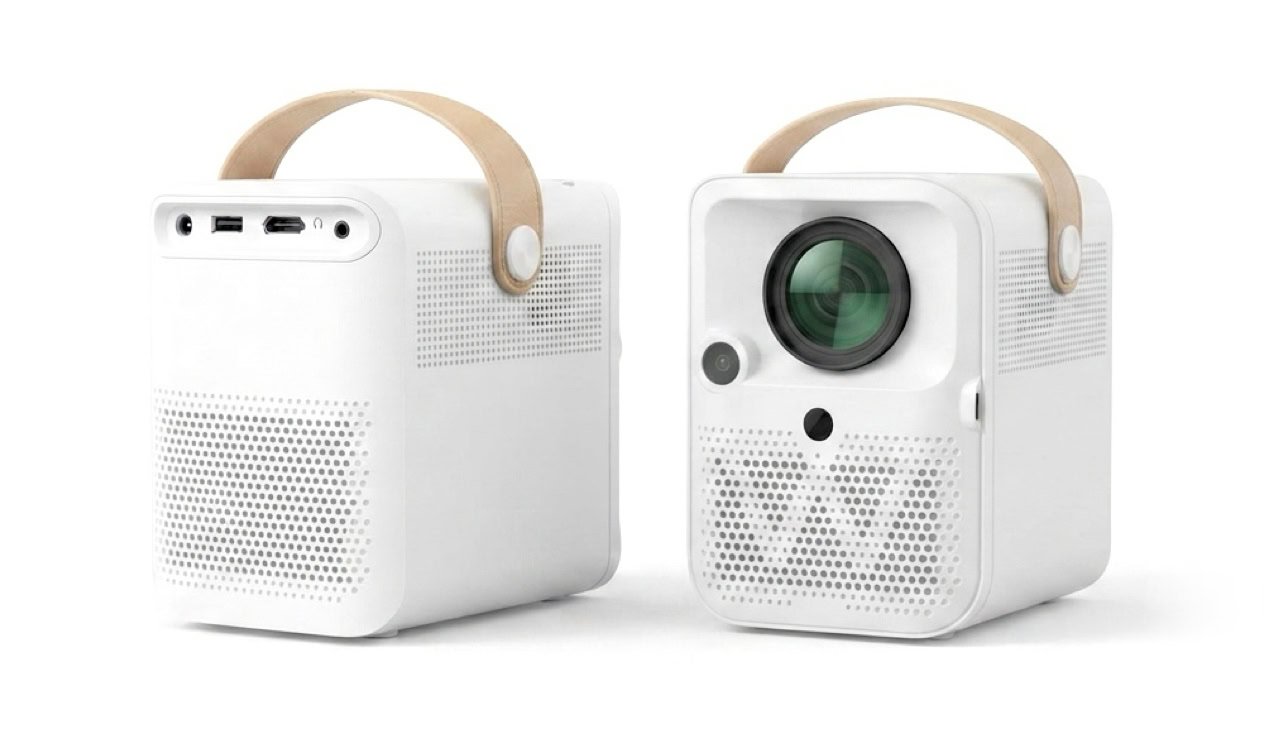
Power port
USB Connection to Infra-Red Camera
HDMI
IR Receiver
IR Receiver
IR Camera
Projector Lens
USB Connection to IR Camera
Left channel speaker
Right channel speaker
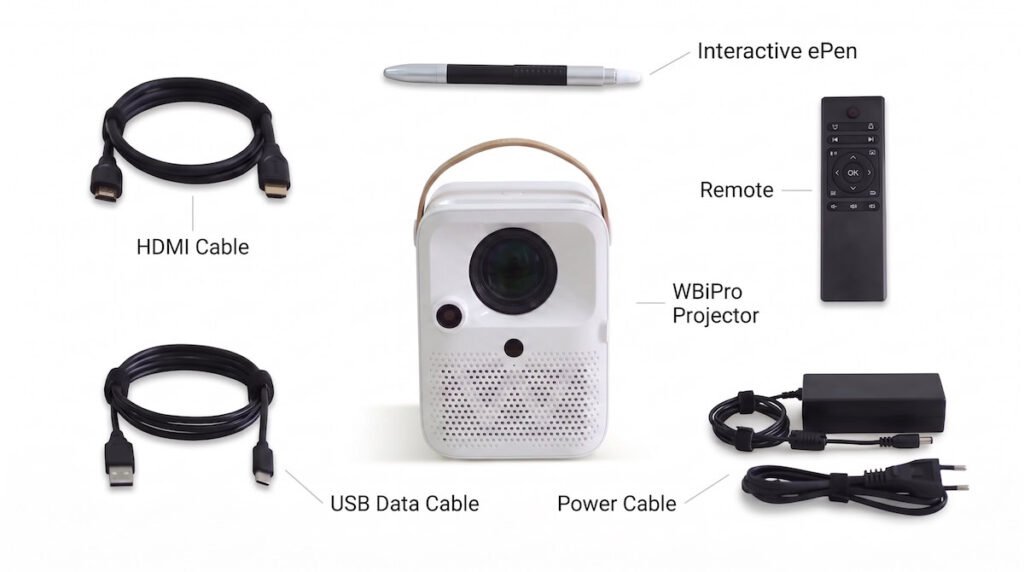
WBiPro interactive smart projector
Interactive ePen
remote control
HDMI cable
USB data cable
Power cable
HDMI cable
USB data cable
Power cable
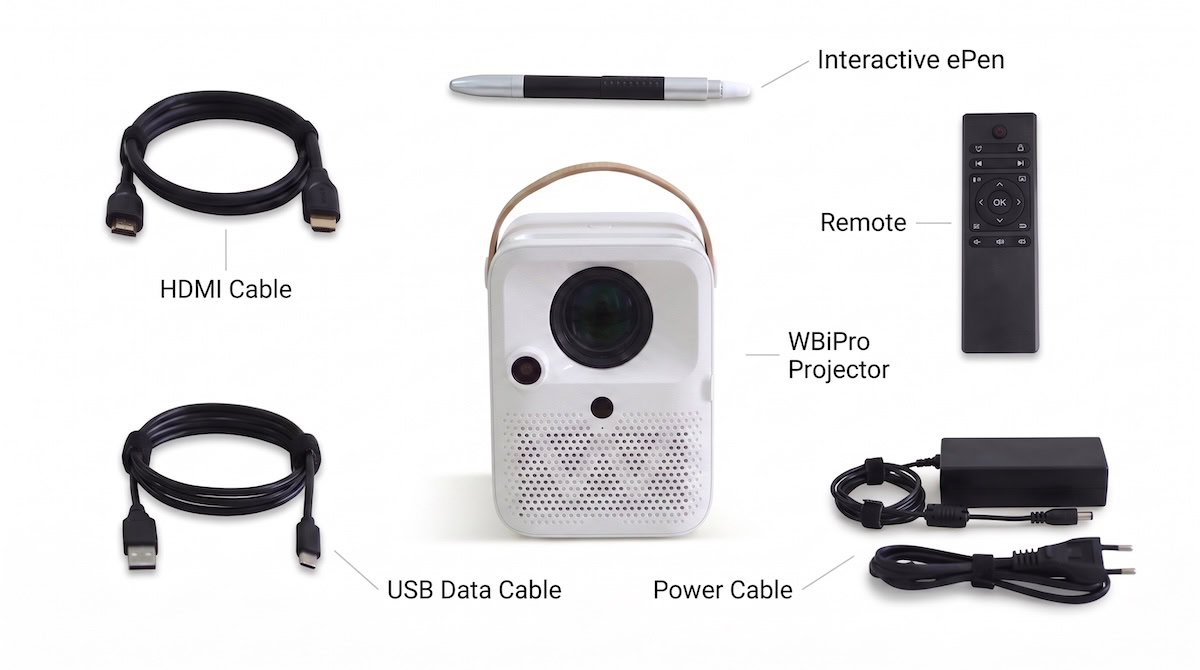
WBiPro interactive smart projector
Interactive ePen
Interactive ePen
Specifications
Dimensions & Weight
- 13.5 × 10.4 × 14.8 cm (Weight: 1.9 kg)
Display & Projection Performance
- 3.97-inch LCD panel with LED backlight
- 3,300 ANSI lumens
- Original 1920×1080p
- Default 16:9 aspect ratio
- Contrast ratio 1500:1
- Light source uniformity is 75%
- 30-100 inch diagonal screen size
- 0.94-3.5m projection distance
- ±50° Digital Keystone Correction with 4-sided Trapezoidal Correction
Audio & Hardware Features
- Built-in speakers (2x3W)
- 1 x HDMI ports, 1 x USB port, 1 x headphone jack
Power, Safety & Lifespan
- Maximum power consumption: 55W
- Equipped with overheat protection
- Light source lifespan > 20,000 hours
your next step in digital transformation
Get a Customized Quotation & Hardware Demo for Your School
Contact Us
Frequently Asked Questions
What is an interactive projector, and how does it work?
An interactive projector is an all-in-one device that projects a computer screen onto a plain wall or whiteboard and turns that surface into a touch-responsive digital board. Using a special infrared electronic pen (ePen), teachers can write, draw, erase, and control software directly on the projected wall image just like a smartphone touchscreen.
Unlike heavy smart TVs, interactive projectors like WBiPro are lightweight, portable, and can create a massive 100-inch interactive display on almost any flat surface without requiring expensive touch-screen glass.
Can an interactive projector work on a plain concrete wall or green blackboard?
Yes. Interactive projectors do not require special electronic whiteboards or expensive glass panels. You can project directly onto a smooth, light-colored concrete wall, a standard dry-erase whiteboard, or a flat painted surface.
The infrared sensor camera tracks the motion of the ePen across the wall surface, eliminating the need for schools to renovate classrooms or buy specialized display boards.
Do teachers need a laptop to use the WBiPro interactive projector?
No, a laptop is optional. WBiPro features a native built-in whiteboard system that allows teachers to turn on the projector and immediately begin writing, drawing, and using geometry tools without plugging in a computer.
However, if a teacher wants to use advanced Windows utilities, annotate PDF textbooks, or show PowerPoint slides, they can easily connect any laptop using a simple 1-cable setup (HDMI and USB-C).
How long does it take to set up and calibrate the projector in a classroom?
Initial setup takes less than 5 minutes, and first-time ePen calibration takes only 1 minute.
Once the initial 1-minute optical alignment is complete, the projector remembers the surface coordinates. Teachers simply plug in their laptop or power on the native whiteboard to start teaching immediately without wasting lesson time on technical adjustments.
What happens if the school does not have reliable internet or Wi-Fi?
The WBiPro projector and its teaching software are 100% functional offline. Both the onboard native whiteboard and the downloadable Windows MultiBoard software run locally on the hardware and connected laptops without requiring an active internet connection.
Teachers can conduct full interactive lessons, annotate PDF exam papers, and use digital geometry tools completely offline, making it ideal for rural schools and areas with unstable network infrastructure.
Are interactive projectors better for schools than heavy interactive Smart TVs?
Yes, interactive projectors offer distinct advantages for schools in developing regions:
Portability: Weighing a fraction of an 80kg Smart TV, a projector can easily be moved between classrooms or locked in a secure office overnight to prevent theft.
Lower Cost & Bigger Screen: Projectors deliver a 100-inch display at a fraction of the cost of a large flat-panel TV.
Durability: Smart TV screens can shatter if struck by objects in crowded classrooms. With a projector, the image is on the wall, making it immune to physical impact damage.